
- AI agents can handle tasks, use tools, and take actions.
- Building an agent requires a model, framework, tools, memory, and controls.
- OpenDots provides the workspace, while Gemini 4 Argon can handle reasoning. Their compatibility needs testing.
- Developers can build agents by setting up OpenDots, connecting a model, adding tools, and testing the workflow.
- Production-ready agents need strong security, monitoring, human approval, and cost control.
Imagine asking an AI system to research a topic, collect information from different sources, analyze the findings, and prepare a report. A regular chatbot can answer questions and generate content, but an AI agent can handle multiple steps in this process. So, how can developers build such systems using open-source tools?
Building open-source AI Agents requires more than connecting a large language model (LLM) to an application. It involves combining a model with memory, tools, orchestration, and an execution environment. Platforms such as OpenDots provide an open-source starting point for building persistent AI agents, while Gemini 4 Argon can potentially power their reasoning capabilities.
What Do You Need to Build an Open-Source AI Agent?
Before building an AI agent, it helps to understand what happens behind the scenes. An agent may appear to handle a task independently, but several components work together to make that possible.
Here are the five essential components of an AI agent architecture:
- Foundation Model: This is the intelligence behind the agent. It understands user instructions, processes information, reasons through tasks, and generates responses.
- Agent Framework: Think of this as the coordinator. It manages workflows, decides how tasks should progress, and connects different components.
- Tools and APIs: These give an agent the ability to interact with the outside world. It can retrieve information, access databases, search websites, and connect with external applications.
- Memory and State: An agent needs context to work through tasks. Memory helps it retain relevant information, while state management tracks progress and previous actions.
- Execution and Control Layer: This component manages how an agent performs tasks. It handles permissions, monitors execution, manages errors, and introduces human approval when required.
When these components work together, an AI system can do more than respond to questions. A conventional chatbot generates answers based on user prompts, while an autonomous AI agent can break a request into smaller tasks, select the right tools, and take actions to achieve an outcome.
This is the key difference between agentic AI vs. generative AI. While generative AI focuses on creating content, agentic AI uses reasoning, planning, and execution to complete tasks.
Gemini 4 Argon and OpenDots: How Do They Work Together?
An AI agent needs two things to function effectively: a model that can understand and reason through tasks, and an environment that manages how those tasks are performed. This is where Gemini 4 Argon and OpenDots come into the picture. Although they work at different levels, they can potentially form part of the same AI agent architecture.
Gemini 4 Argon as the Reasoning Engine
Think of Gemini 4 Argon as the intelligence behind an AI agent. As a proprietary reasoning model, it can potentially support workflows that involve complex instructions, multiple steps, information processing, and tool selection.
Developers can access models through APIs and connect them to applications. However, choosing a model involves more than looking at its reasoning capabilities. Response accuracy, latency, API access, and usage costs also matter. Comparing AI model capabilities and costs can help teams evaluate their options.
OpenDots as the Agent Workspace
While the model handles reasoning, OpenDots provides the environment for managing AI agents. It is an open-source template for building persistent agent workspaces, where developers can configure agents, connect external tools and services, and manage ongoing tasks.
It also supports user interaction and approval mechanisms, giving people greater visibility and control over agent activities.
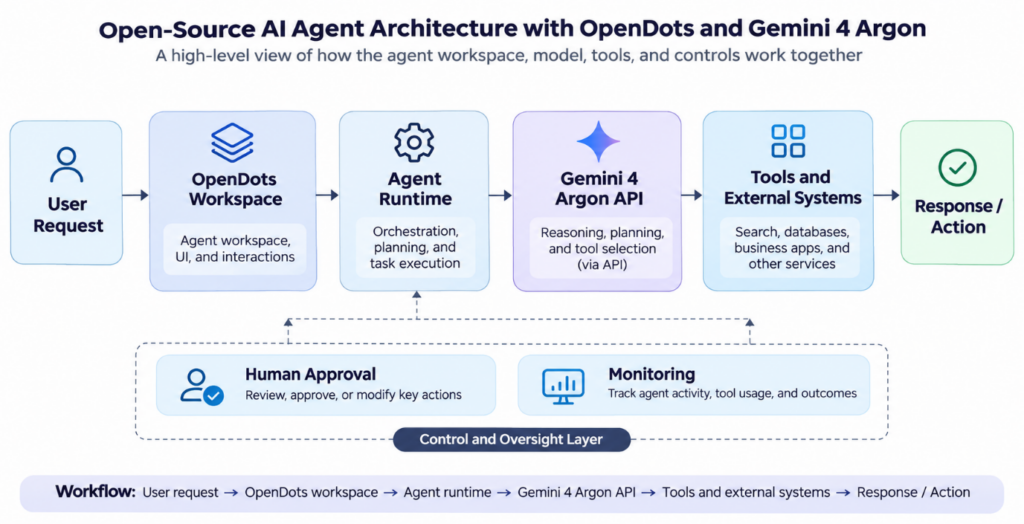
Together, these technologies offer a potential approach to building AI agent workflows. OpenDots can manage the workspace and execution environment, while Gemini 4 Argon can provide the reasoning capabilities. However, their direct compatibility must be validated before implementation.
Recommended architecture:
User Request → OpenDots Workspace → Agent Runtime → Gemini 4 Argon API → Tools and External Systems → Response or Action
Human approval and monitoring should support the workflow, particularly when an agent performs consequential actions.
Choosing the right foundation model also requires evaluating its reasoning capabilities, response accuracy, latency, and API pricing. Understanding the differences between leading AI models can help developers make informed decisions. Explore our comparison of AI model capabilities and costs to understand how model performance and pricing influence technology selection.
How to Build an AI Agent Using OpenDots
Building an AI agent becomes easier when you break the process into smaller steps. Let’s take a research agent as an example. Its job is to collect information from approved sources, analyze the findings, and prepare a report for human review. The implementation involves the following steps.
Step 1: Set Up the OpenDots Environment
Start by accessing the OpenDots GitHub repository and reviewing its setup instructions. Check the required software, install the dependencies, and configure the environment variables. Before moving ahead, make sure the workspace runs correctly.
For the setup described in the project, the commands are:
git clone https://github.com/CopilotKit/OpenDots.git
cd OpenDots
npm ci
cp .env.example .env
npm run dev
The local application provides the starting workspace. Developers must configure the required Intelligence service and model provider before enabling agent conversations.
Step 2: Configure the AI Model
Next, connect the foundation model that will handle reasoning and task planning. Add the required API credentials through environment variables rather than hardcoding them into the application.
Gemini 4 Argon can be considered a potential reasoning model, provided the chosen setup supports its API and integration requirements.
Step 3: Connect Tools and Define Agent Tasks
Tools and APIs allow agents to interact with external systems. Connect approved search services, databases, and business applications based on the agent’s responsibilities.
For the research agent, the workflow could involve:
- Receiving a research request.
- Retrieving information from permitted sources.
- Analyzing the results.
- Preparing a structured summary.
- Requesting human approval before sharing or saving the report.
AI agents can also support specialised business workflows. Explore PalTech’s work on an AI underwriting agent for commercial property.
Step 4: Configure Memory and Permissions
Configure memory and state management to retain relevant task information across interactions. Define which resources the agent can access and which tools it can use. Introduce approval checkpoints for sensitive operations.
For example, a research agent may retrieve documents and prepare reports but should not automatically share confidential information with external users.
Step 5: Test the Agent Workflow
Test the agent with different requests and operating conditions. Evaluate task completion, tool-call failures, unsupported responses, permission violations, and human approval behavior.
Once the prototype works reliably, developers can focus on deployment, monitoring, and maintenance. Moving from a functional prototype to a dependable application requires a structured engineering approach. Explore AI-driven development from prototype to production to understand this transition.
OpenDots vs. Other Open-Source AI Agent Frameworks
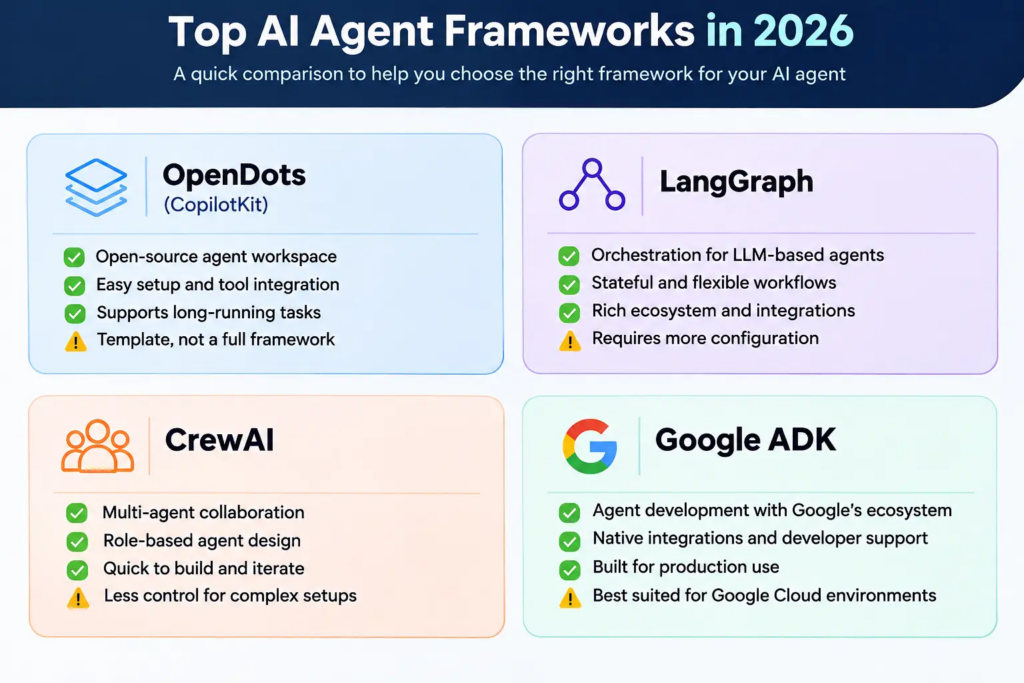
Developers can choose from several open-source AI agent frameworks, depending on the complexity and requirements of their applications.
|
Framework |
Primary Focus |
Suitable For |
|
OpenDots |
Persistent agent workspace |
Interactive AI coworkers |
|
LangGraph |
Stateful orchestration |
Complex agent workflows |
|
CrewAI |
Multi-agent coordination |
Role-based agent systems |
|
Google ADK |
Agent development toolkit |
Custom agent applications |
OpenDots focuses on persistent workspaces and user-facing agent interactions. LangGraph provides greater control over stateful execution, while CrewAI supports specialized agents that coordinate tasks. Google ADK offers a code-first approach to agent development.
These tools are not direct substitutes. Their architecture and level of abstraction differ. The right choice depends on integration requirements, workflow complexity, deployment preferences, and developer experience, not popularity alone.
Challenges of Deploying Autonomous AI Agents
A functioning prototype does not automatically make an agent ready for enterprise deployment. Organizations must address several technical and operational challenges.
- Unreliable Execution: Agents may produce incorrect reasoning, select unsuitable tools, or leave tasks incomplete.
- Security and Permissions: Unrestricted access can expose sensitive data or allow unauthorized actions. Prompt injection can also manipulate tool-connected agents.
- Observability: Without logging and tracing, developers may struggle to identify decisions, tool calls, and execution failures.
- Operational Costs: Model API usage, infrastructure expenses, and repeated execution loops can increase operating costs.
Enterprises need clear boundaries around what agents can access and execute. An AI governance framework helps establish accountability, security requirements, and human oversight.
Best Practices for Building Production-Ready AI Agents
Building reliable autonomous AI agents requires a structured approach to development, testing, and monitoring. Developers should consider the following practices:
- Define clear tasks and measurable success criteria before development.
- Apply least-privilege permissions to restrict agent access.
- Introduce human approval for sensitive or irreversible actions.
- Implement logging and tracing for agent decisions and tool calls.
- Test failure scenarios, including API errors and unexpected inputs.
- Monitor model usage, response latency, and operational costs.
- Use repeatable evaluations to improve reliability before scaling.
Production deployment also requires a consistent operating model for monitoring, testing, and maintaining agent systems. AI operations and LLMOps can help teams manage model performance and operational reliability. Organizations deploying agents at scale can also explore AI operations and governance to strengthen oversight and operational controls.
Conclusion
Building open-source AI agents involves combining model intelligence with agent orchestration, tool integrations, execution environments, and governance. OpenDots provides an open-source starting point for persistent agent workspaces, while Gemini 4 Argon can be evaluated as a proprietary reasoning-model option. However, technology selection should depend on model compatibility, application architecture, security, and operational requirements. PalTech helps organizations explore AI agents and business process automation by evaluating use cases, designing secure architectures, and integrating intelligent systems into business workflows.
Frequently Asked Questions
What are open-source AI agents?
Open-source AI agents are systems built using publicly available code or frameworks that developers can inspect, customize, and deploy. Their foundation models may be open-source or proprietary. Therefore, an open-source agent framework does not necessarily mean the model powering it is also open-source.
Can OpenDots work with Gemini 4 Argon?
Integration depends on the model interfaces and configuration OpenDots supports. Developers must validate authentication, model access, streaming, and tool-calling behavior before establishing compatibility with Gemini 4 Argon.
Which open-source framework is best for building AI agents?
The best framework depends on the application. OpenDots supports persistent agent workspaces, LangGraph focuses on stateful orchestration, CrewAI supports multi-agent coordination, and Google ADK provides a code-first development toolkit. Developers should compare workflow complexity, integration requirements, deployment models, and developer experience.
What is the difference between an AI agent and an AI automation tool?
An AI automation tool generally follows predefined rules and workflows to complete tasks. An AI agent uses model-guided reasoning to interpret instructions, select tools, and adjust its actions based on available information.
Can open-source AI agents be deployed in enterprise environments?
Yes. Open-source AI agents can be deployed in enterprise environments when supported by appropriate infrastructure, security controls, access permissions, monitoring, and governance. Organizations must also consider data privacy, model dependencies, licensing, and ongoing maintenance.
What are the main challenges of building autonomous AI agents?
The main challenges include unreliable execution, tool integration, state management, security risks, prompt injection, performance evaluation, and operational costs. Developers need to address these areas before scaling agent systems.